|
|
|
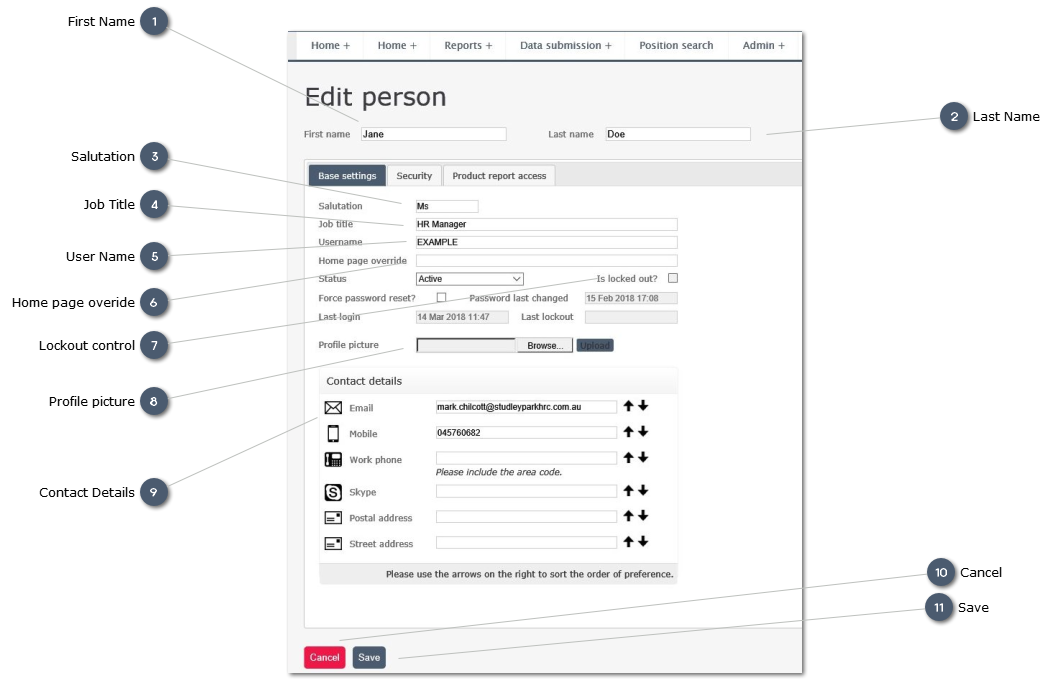
 First NameEnter preferred First Name
| |
 Last NameEnter Last Name
| |
 SalutationEnter preferred form of address
| |
 Job TitleEnter User's Job title within the organisation
| |
 User NameEnter a unique User Name for this user.
As the User's email address is already a b=nunique name we recommend that this nis also used as the UserName
| |
 Home page overideSelect a different page to display when the user first logs in.
For most users this shoudl be left blank, to retain the Home page as the default.
| |
 Lockout controlSelect this checkbox if you wish to lock a registered User out of the system
| |
 Profile picture
Add a picture of the User tothe record:
-
Browse to select a file from your local drive -
Click "Upload" to load the picture
| |
 Contact DetailsEdit Personal Contact details:
-
-
Main organisation phone line -
-
this is critical to ensure system messages and reports are sent to the correct person -
| |
 Cancel Cancel any changes made and revert to original record without saving
| |
 SaveSave any changes made to User record
| |
|
|
|
|