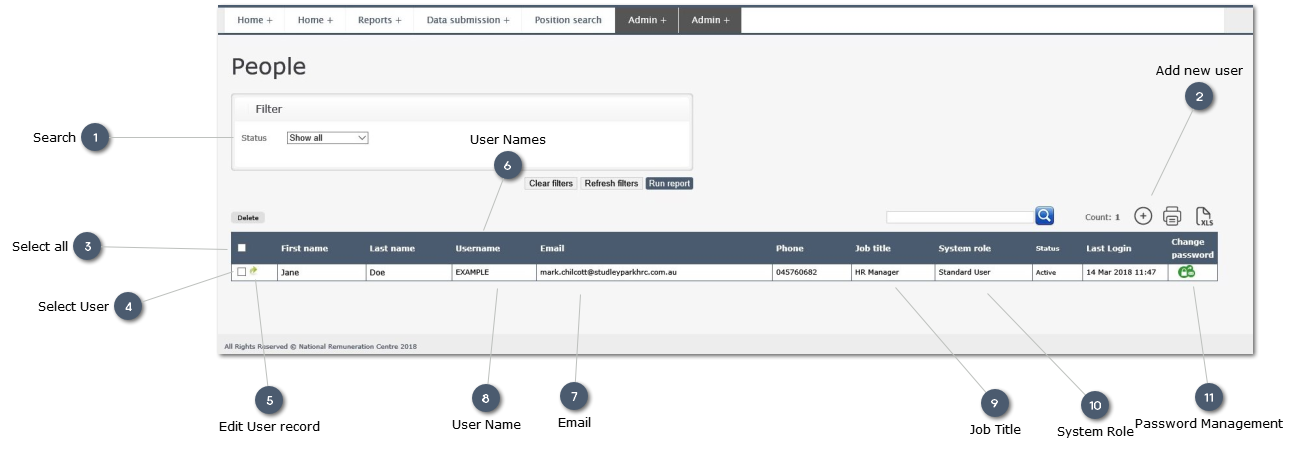
Overview:
The User Tab allows a User with Administrator access rights to manage the Users who have access to the system.
Through this tab the Administrator can:
-
-
-
Modify data for existing Users:
-
-
-
 SearchSearch for a specific User
|
|
 Add new userClick here to add a new User.
When you have created and saved a new User record, go to the "Report Access" tab and set the options for report access for the new user.
|
|
 Select all
 users
|
|
 Select UserCleick to seelct User to delete or copy the record
|
|
 Edit User record
Click on the green arrow to edit the individual record:
-
-
Change Report access rights
|
|
 User Names
Enter First Name and Last Name for the User
|
|
 Email
User Email address
|
|
 User NameClicking on the User Name allows the Administrator to edit the data held in the User record.
|
|
 Job Title
The formal Job Title for the role held by the User
|
|
 System RoleThis displays the system role held by the User.
|
|
 Password ManagementClick on this icon to edit the User Password.
This may be necessary if the User cannot recall the Password, or the Password needs to be changed as it has been compromised by someone who does not require access.
|
|