Overview:
Use this form to edit an existing record.
The same form is used for adding a new record, however in this case the majority of the fields will be blank.
Note that as the range of Benefits provided will vary in different surveys, this guide does not attempt to provide information on individual Benefits. insightpay will provide guidelines on the Benefits included in each survey when we contact organisations requesting that data be updated.
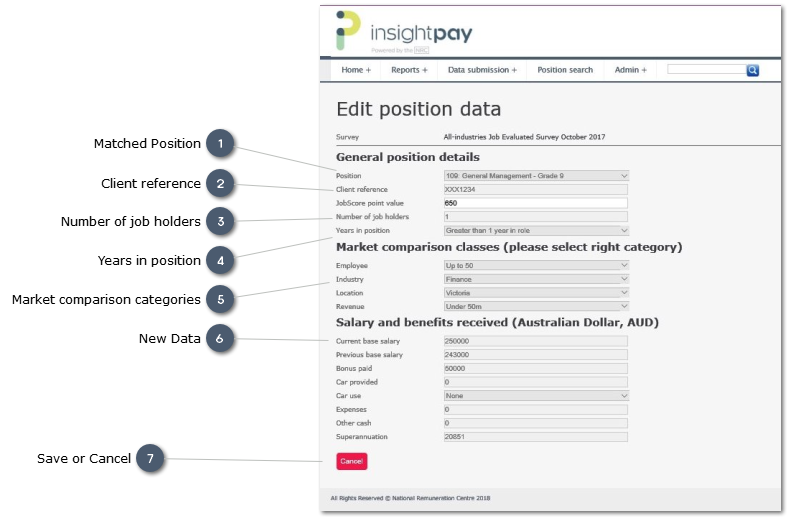
 Matched PositionThe survey position against which data is currently being submitted:
-
Use the droplist to change the position against which the job is matched.
|
|
 Client referenceThe reference provided by the organisation when this record was submitted. This may be a position reference, or an employee number for example.
It is not mandatory to supply a Client reference, however it does make it easier to identify individual records when reviewing survey results or updating data in the future.
|
|
 Number of job holdersTypically "1"
This field should only be used to show multiple job holders where all fields in the record are identical. This is actually very rare, as even where Base Salary is the same, other data fields are likely to vary.
Where an organisation employs more than one person in a single role, all records should be submitted individually to ensure accurate analysis of all data.
|
|
 Years in positionThe number of years this job holder has been employed in this position. Use the drop-list to select the right category.
The data collected is on the number of years the current job holder has been in the position for which data is being submitted:
-
it is not the number of years the job holder has been employed in the current organisation.
|
|
 Market comparison categoriesThe market comparison categories against which this record is compared.
For an existing record these fields will display the values provided at the last data submission.
The selections can be varied for individual records, to reflect the profile of the business unit the employee is attached to. Typically changes will be confined to Location and Industry, however other fields may vary where an organisation is providing data for subsidiary organisations.
|
|
 New DataThe Base Salary etc (i.e. not including any Benefits) being paid at the date of the survey.
|
|
 Save or CancelClick to save your changes.
Note that all fields are validated before the record is submitted. Should this validation process identify any potential errors, the record will not be saved and a warning will appear at the top of the form:
-
Messages in red text identify fields where the data is incorrect, and does not meet validation criteria
-
These errors will have to be corrected before the record can be submitted.
-
Messages in orange text are warnings only, and provide an opportunity to check your input for input errors
-
These fields should be corrected if necessary, however the record can be saved without change if the data is correct.
-
If you wish to save a record which has been queried, but which is correct, select the Checkbox to the left of the record, then click the Save button
|
|
Note:
To delete an individual record:
-
Return to the View position data" screen
-
Identify the record to be deleted
-
Use the filters ands Search options if necessary
-
Select the checkbox on the left of the record
-
Use the "Delete" command button at the top left of the list to delete