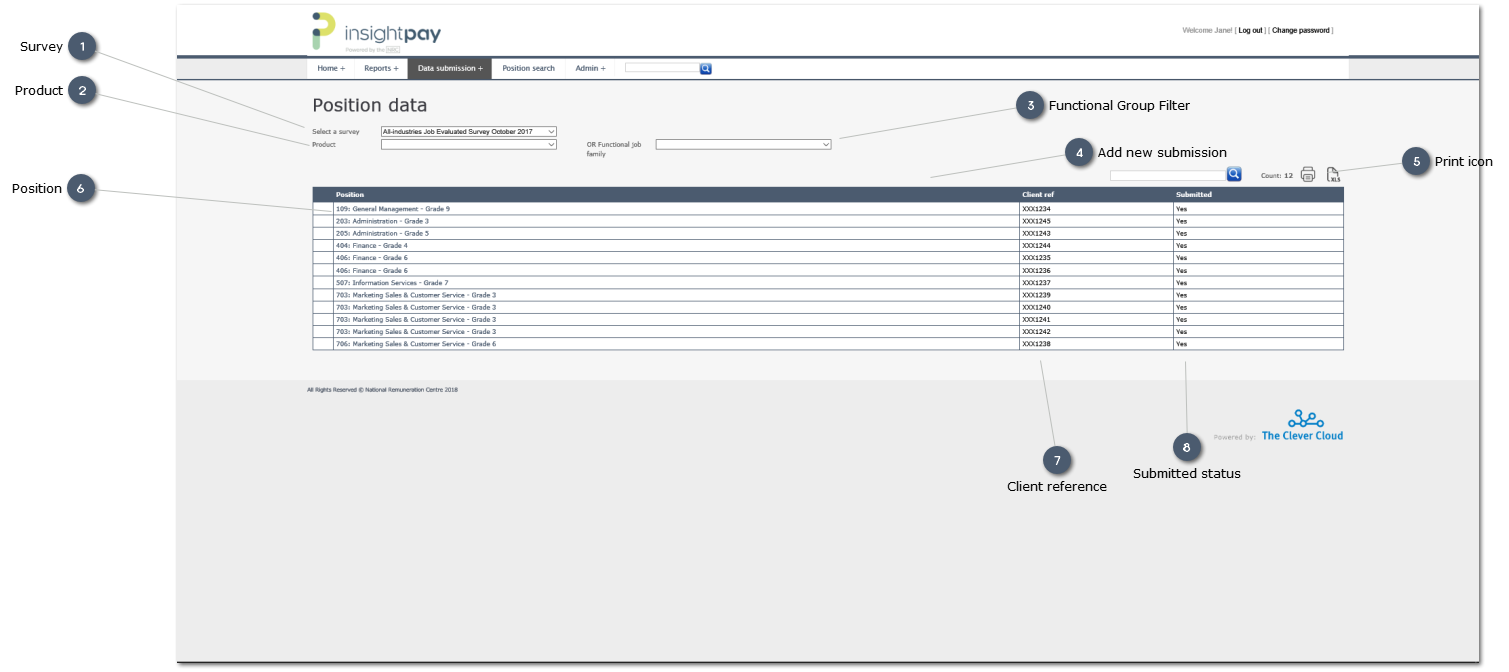
Overview:
This screen is triggered when the View position data" link is used on the main Data submission screen.
This option provides a listing of all current records for the organisation, allowing each record to be selected and edited individually on-screen.
Click on any column header (e.g. Position) to sort the records in Ascending or Descending order.
 SurveyThe survey for which data is being updated
|
|
 ProductUse the droplist to select a specific Product (e.g. Top Executive; General Staff) for update.
Leave this field blank to list all records for all Products.
|
|
 Functional Group Filter
Use this "Search" option to refine your search to identify all records in a specific Functional Group. This can be very useful when dealing with large numbers of records which makes scrolling through the list manually inefficient.
|
|
 Add new submissionClicking on this icon opens a blank form which can be used to add a single new record.
|
|
 Print iconPrint a copy of the listing to your local or network printer.
|
|
 PositionClick on the position name to open the edit screen
|
|
 Client referenceThe reference provided by the organisation when this record was submitted. This may be a position reference, or an employee number for example.
This can be used in the "Search" field to locate a specific record.
|
|
 Submitted statusText field showing whether or not a record has been updated:
-
-
This will be displayed only once the "Mark . . . as complete" option is used on either this screen or the man Data submission screen. -
|
|