
Market Rates Report
Report Overview:
Use this report to compare your pay against the market comparators for which you contribute data (Asset, Turnover, Industry, Location and Employee numbers). The report also includes national data.
The report provides a very quick way of establishing where your organisation is paying against the market segments within which the organisation operates.
Note that the report is restricted to those roles for which your organisation has contributed data.
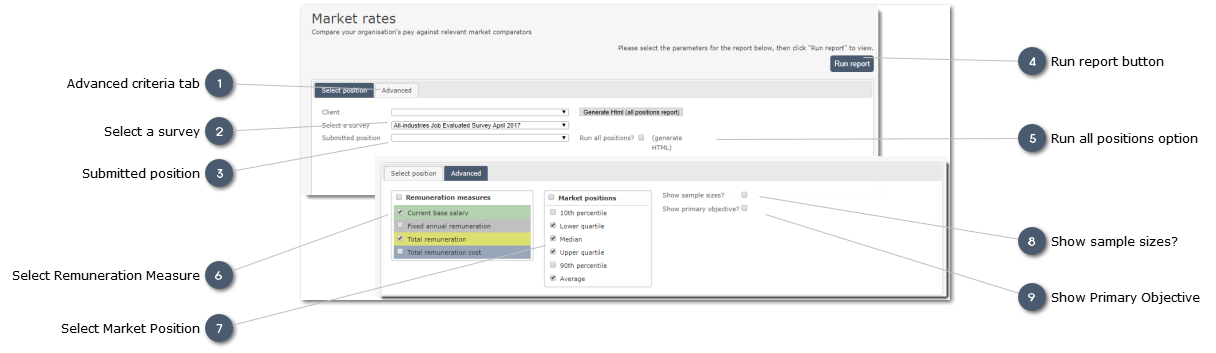
Use the filter drop-lists to select the role for which a report is required:


 Run all positions option Select this checkbox to print all reports. The report will be produced on-screen (in HTML format) initially, allowing the user to examine the reports, and drill down to detail using the interactive charts. The reports can then be printed if required using your browser print options. Note that the on-screen view does not show the insightpay header and logo; these are included in the printed reports.
If you have a PDF Printer installed on your pc/laptop you can also use this to produce a PDF-format file containing all the reports on all records contributed. If you do not already have access to a local PDF pronter, talk tpo your IT support group to see if one can be installed. Many are available at no cost.
Note that where the total number of records submitted is in excess of 400 there may be a delay while your request is processed.
You will be advised when the file is available for download.
|