


Reports +
Overview:
The analysed survey data is available through a wide range of reports accessed through this screen.
Many of these reports are dynamic web-based reports, which allow for the selection of survey roles and other data to extract key information for use in managing remuneration programmes.
Other reports are presented as Adobe PDF documents which can be downloaded for local access. Typically these downloadable reports contain static data and/or added commentary which assists in understanding of the analysis ands longer term trends in remuneration management.
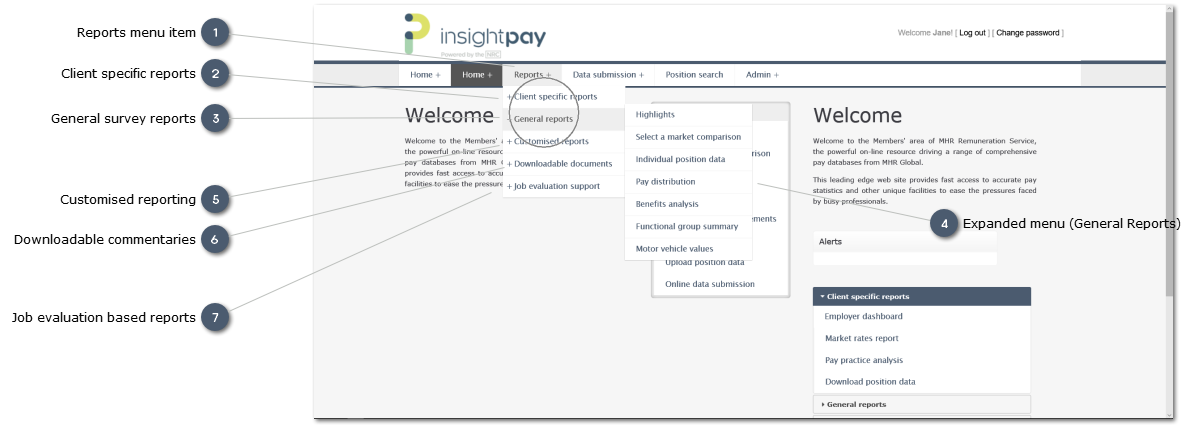
To view the Reports available in each section click on the Section link. This will expand the selection and display the Reports available, along with a brief explanation of each.


 Client specific reportsThese reports compare the submitted client data directly with the analysed market data. The reports are restricted to those roles for which a record (or records) have been submitted during the Data submission process.
To get the maximum benefit from the RemData system it is essential that users contribute a full range of data on as wide a range of roles as possible.
The reports available here are:
|
 General survey reportsThese reports provide detailed information on survey analysis for all positions surveyed. Unlike the Client Specific Reports the General Survey Reports therefore allow a user to access information on all survey roles, even where data may not have been submitted.
Note that these reports provide static data only, as they are restricted to standard analyses, similar to the type of data which would be included in traditional printed reports.
The General survey reports are:
|

 Customised reportingThese reports offer additional functionality to the general survey reporting. They allow users to drill down into more detail, and to refine reports to provide increased focus on specific market segments.
The reports available are:
|

 Job evaluation based reportsThese reports provide a means of converting insightpay's Job evaluation points to remuneration values.
Note:
The conversion uses JE points generated by insightpay's JobScore system.
Where a user has access to Hay job evaluation points (either directly from the Hay system, or converted to indicative Hay values from a different system) we do provoide an option to convert these values to indicative insightpay values. In such cases the indicative insightpay value can be used to generate indictive remuneration. Reliance on this information is at the users's risk however, as insightpay acceots no liability for the accuracy of any evaluation carried out using systems other than our own JobScore system.
There are two reports:
This uses the Market Index Value generated using JobScore to define an indicative remuneration range for the role. The report is simialr to the Indicative Pay Ranges report, and allows the user to select different market segments for inclusion in the analysis This report allows users of insightpay's online job evaluation system, JobScore, to develop and maintain banded remuneration structures which combine evaluation results with insightpay RemData results. The resulting structure can be saved within the insightpay RemData environment, and accessed at a later date for review or updating. The structure can also be exported to MS Excel.
This report is available only to licensed users of the JobScore system, and may not appear on your menu
|