Pay Practice Analysis Report
Report Overview:
Use the Pay Practice Analysis report to check the relationship between your remuneration levels and a selected market segment.
Note that the report is restricted to those roles for which data has been submitted by your organisation and in which the sample in the selected market segment is sufficiently high to provide viable data analysis.
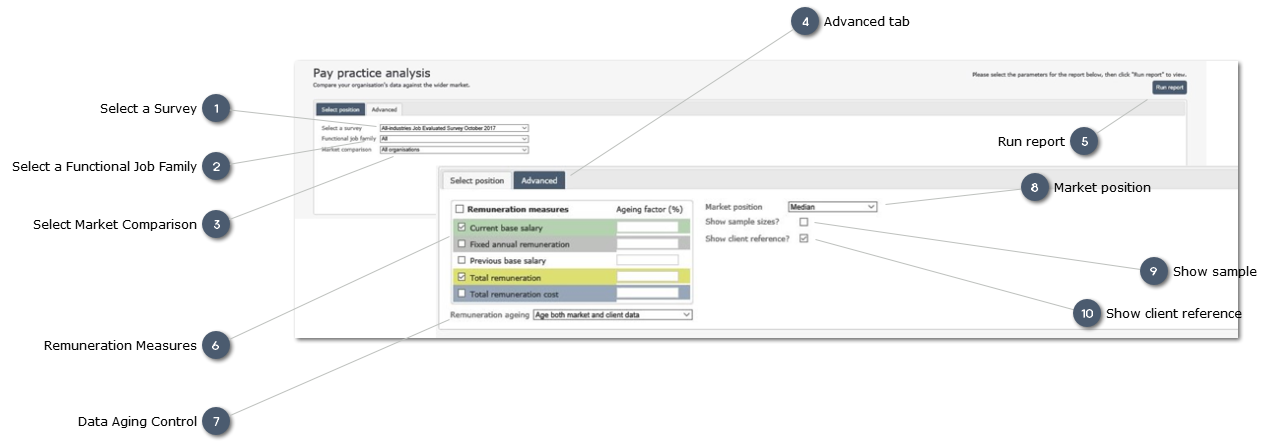
 Select a SurveySelect the survey from which data is required.
The most recent survey shown will be the most recent survey to which the organisation has contributed data.
|
|
 Select a Functional Job FamilyUse the drop-list to select "All functional groups" or a specific functional group of interest
|
|
 Select Market ComparisonUse the drop-list to select the required market comparison.
Where a market comparison other than "All organisations" is selected (e.g. "Industry" or "Employees") a fourth field will be displayed to allow a choice of a specific segment within that comparison group.
Note that the default comparison for the selected criteria is with the market Median (i.e. middle of the market). To select a different point of comparison use the "Advanced" button.
|
|
 Advanced tabUse the "Advanced" button to select other criteria for your report:
-
Aging factors to allow data to be aged to adjust for movements which may have taken place since the survey was completed -
Selection of a market stance other than "Median" (e.g. Upper Quartile) -
Change the report currency from the local currency which is the default.
|
|
 Run reportClick to generate and view the report based on your selected criteria.
Once the Report is generated on screen, the Report can be prointed using the browser print options, or exported to excel for further analysis using the "Generate Excel" button below the report.
|
|
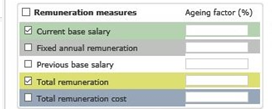
 Remuneration Measures
Select the Remuneration Measures to be displayed on the report by checking the box.
-
Select all measures by selecting the box tot he left of the Header
Age the data by applying a percentage adjsuytment to selected Remuneration Measures
-
For example, age (increase) the data by adding 2.0 percent to each measure to take account of movement since the survey was released.
|
|
 Data Aging ControlUsee the droplist to apply the aging factir to:
-
-
-
Both market and client data
|
|
 Market positionUse the droplist to select the preferred Market position
|
|
 Show sampleCheck the box to include the sample for each record
|
|
 Show client referenceCheck the box to include the Client reference to help identify individual records
|
|