Report Overview:
This report converts a single Market Index Value (Job Evaluation points) to an indicative remuneration value, at Lower Quartile, Median and Upper Quartile, based on selected market segment data.
The report provides a quick way of determining the market value of a role which has been evaluated using insightpay's JobScore job evaluation system. This process is typically used for roles which cannot be directly benchmarked against an existing survey role, or where there is doubt about which survey role provides the most accurate benchmark to use for setting remuneration.
The report is very similar to the
Indicative Pay Ranges Report, but uses the
Market Index Value as the link to the insightpay market data rather than a matched survey position.
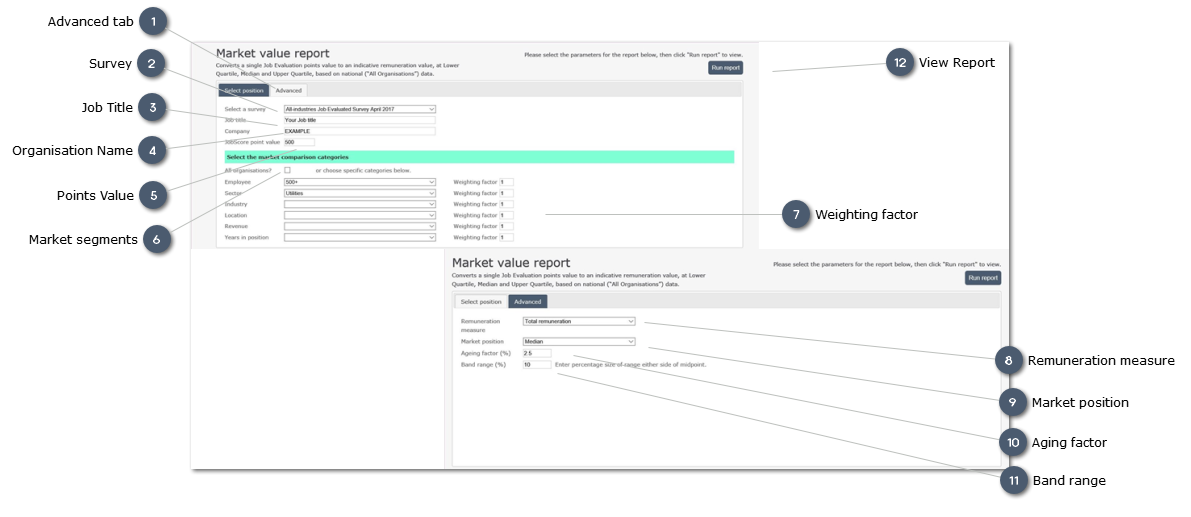
 Advanced tabUse this tab to select Advanced options:
-
Select the Remuneration measure to be used for the report -
Select the Market position at which remuneration is to be calculated -
Apply an Aging factor to the survey data -
Modify the percentage range used to calculate the indicative remuneration range -
the default value used is 10 percent -
This should be sufficient for benchmarking purposes
|
|
 SurveyThe selected survey from which data is sourced
|
|
 Job Title
Enter the job title used to identify the role within your organisation
|
|
 Organisation Name
Enter the organisation name here
|
|
 Points ValueEnter the points value (or "Market Index Value") generated for the role following evaluation using the JobScore system.
|
|
 Market segments
Use the droplists to select the Market segments to be used in the report.
|
|
 Weighting factor
Enter a weighting factor (2 - 3) to increase the influence of that Market segment on the final result
|
|
 Remuneration measureUse the droplist to select the Remuneration measure to be used in the report.
insightpay recommends the use of Total Remuneration in the majority of cases, as this is th emost stable of the different measures available.
|
|
 Market positionUse the droplist to select the preferred market position.
The defualt selection is Median, representing the middle of the range for that market segment.
|
|
 Aging factor
Enter an aging factor as a percentage to adjust the market data to take into account market movement since the date of the survey.
|
|
 Band rangeEnter a percentage to determin the rnage eiter side of the derived midpoint for the range.
The default value of 10 will result in a range from 90 percent to 110 percent of the midpoint value
|
|
 View ReportAfter specifying the report parameters click here
|
|