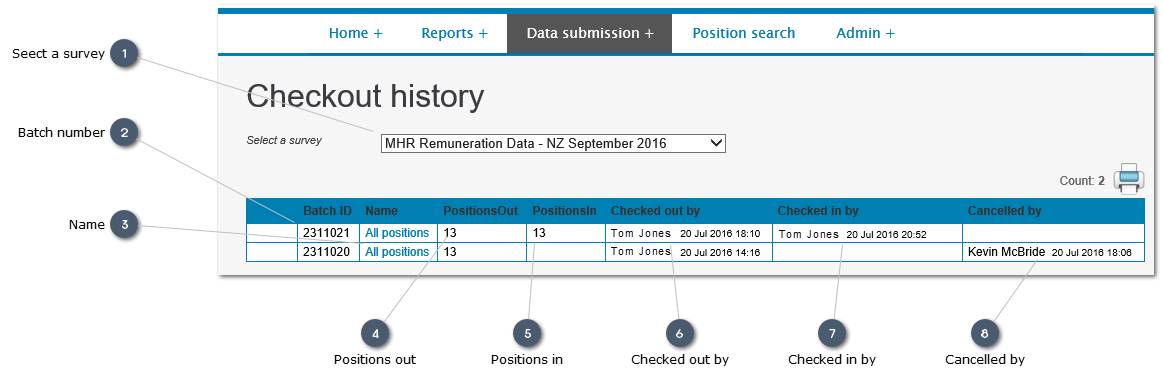
This option alows a user wiht Adminsitration rights to monitor the status of downaoded spreadsaheets:
-
What spreadsheet shave been downoadsed
-
-
Have they been uploaded again or cancelled.
 Seect a surveyUse the dropist to select the survey for whuich data monitoring is required
|
|
 Batch numberA unique identifier for the specific spreadsheet which has been checked out.
|
|
 NameThis identife whether the spreadsheet contains a records previously submitted, or whether itr has been restricted in some way (e.g. to a specific Functional group).
|
|
 Positions outThe number of records included in the downoaded spreadsheet
|
|
 Positions inThe number of records in the spreadsheet when it was uploaded following editing.
|
|
 Checked out byThe name of the User who downloaded the spreadsheet, and the date and time it was downloaded
|
|
 Checked in byThe name of the User who uploaded the edited spreadsheet, and the date and time it was uploaded.
This field will remain blank where a downoaded spreadsheet is cancelled.
|
|
 Cancelled byTher name of the User who has cancelled a downloaded spreadsheet, and the date and timre the download was cacelled. Downloads are typically cancelled only where:
-
A decsion has been taken to update online after downloading the spreadsheet -
An error has been made, and the downloaded spreadsheet is restricted in some way (to a specific Functional Group for example)
A downloaded spreadsheet may be cancelled by a User with Administration rights, or by insightpay.
|
|