Remuneration structure: Advanced options
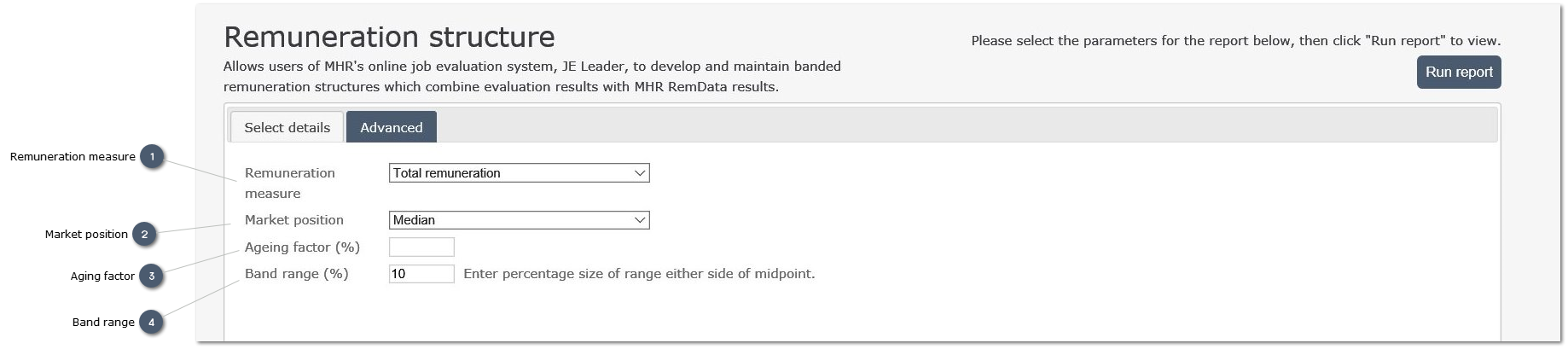
 Remuneration measure
Use the drop-list to select the remuneration measure to be used for creating the remuneration structure.
The default selection is Total Remuneration.
|
|
 Market position
Use the drop-list to selec trhe market posiition (point in the range) at wich data wil be extracted.
Teh default value is "Median" representing the middle of the range.
|
|
 Aging factor
Enter a percentage value to age market data or to offset the remuneratin structure above or below the selected amrket position.
Typically this would be used to age data by applying an index value to increase remuneration values without fully realigning data to new market data.
For example:
-
in Year 1 a new remuenration streuctre is develooped and saved -
In Year 2 this is updated by the application of an index vlaue (Aging factir) of 2.0 percent, base don COI or an agreed settlement -
In Year 3 the structre is realigned to the market by selecting a more recent survey.
|
|
 Band range
The entered value defines the default range from the Midpoint Remuneration value at which the Minimum and Maximum remuneration values are calculated.
The default value of 10 results in a remuneration band wihc runns from 90.0 percent to 110.0 percent, wiht a modpoint at 100.0 percdsnt.
|
|